
CMXby QED Works
The contract system that makes sure what you signed actually happens.
AI you can check. Your contracts stored in your region.
Where contracts lose money
Not in the drafting. After signature, when nobody is watching the dates.
- A renewal window missed.The notice deadline passes and the contract renews on terms nobody chose, for another full term.
- An escalation never applied.The increase the contract allows is never billed, and the difference is lost every year it runs.
- A rebate never claimed.The supplier owes a rebate nobody asks for, so it is never paid.
- An insurance certificate lapsed.The cover the contract requires runs out unnoticed, and the risk comes back to you.
It makes contracts happen, not just stores them.
Every obligation in every contract becomes a record owned by a role, with a person in that role, cover for leave, evidence, verification and reminders on your business days. When someone resigns, you fill the role; you don’t edit every contract.
AI you can check.
CMX reads the contract and proposes dates, parties, amounts and obligations. Each one points to its page and words. Your people confirm. Nothing a model finds counts until someone does.
Your region, your rules.
Your contracts are stored in your region: South Africa today, with EU and US hosting on request as a dedicated deployment. Every due date and reminder respects your public holidays. South Africa’s are set up for you; the calendar is yours to edit.
How CMX works
A contract’s life in CMX, in the order it happens. Each step opens its features.
- 1RequestAnyone asks for a contract on a form that says where it goes.Enterprise
- 2Draft in WordWord stays the editor. Each version is compared with your clause library.Enterprise
- 3Legal reviewA changed locked clause stops the draft being finalised until a legal reviewer accepts it.Enterprise
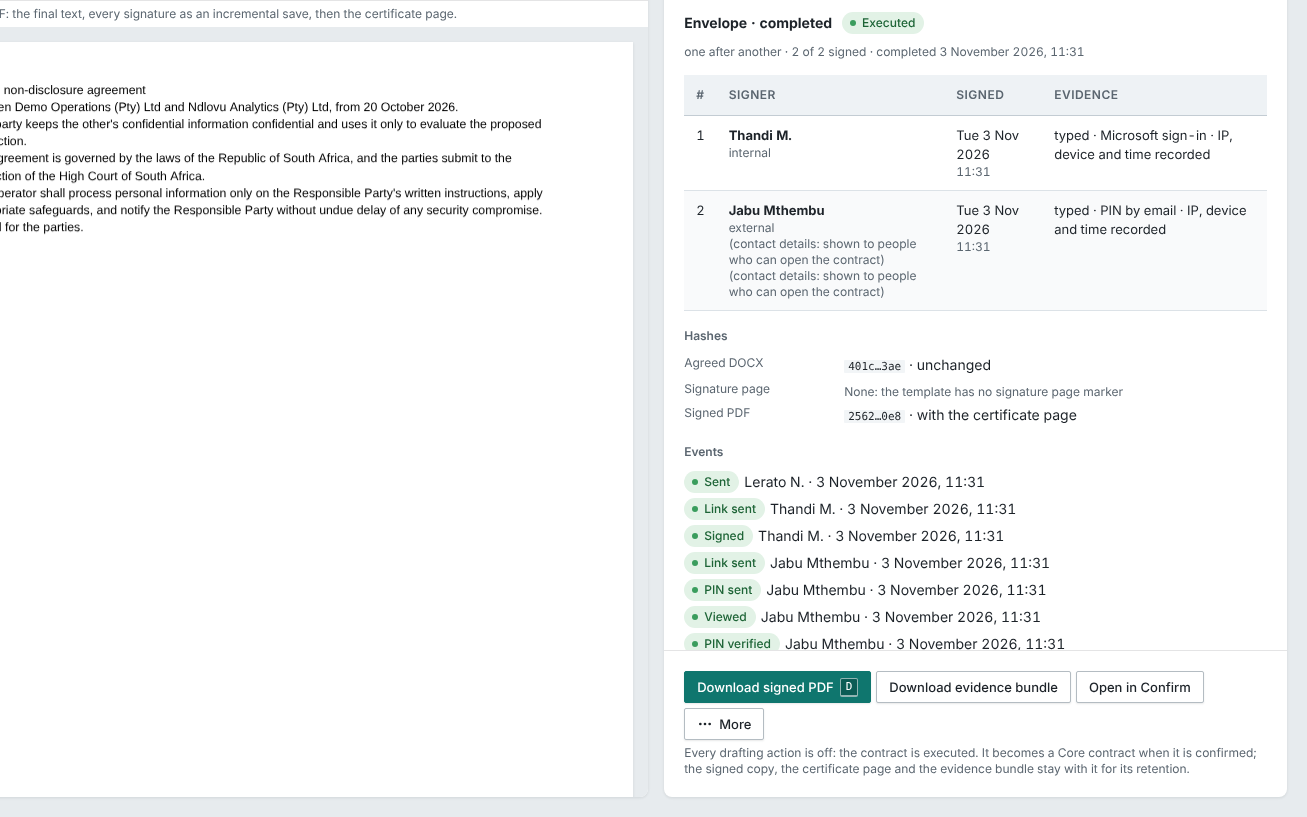
- 4SignElectronic signature, with the evidence on the executed PDF.Enterprise
- 5Bring in signed contractsFiles, a ZIP, email, or your old register.Core
- 6AI proposes, a person confirmsEach value points to its words. Nothing counts until a person confirms it.Core
- 7Obligations runOwners, reminders, evidence and verification.Core
- 8Renewal decidedAlerts from the notice deadline, and a decision with a reason. Approval steps on the decision are Enterprise.Core
- 9InsightsValue, risk and board packs across your contracts.Enterprise
Enterprise · before signature
- 1. RequestAnyone asks for a contract on a form that says where it goes.Enterprise
- 2. Draft in WordWord stays the editor. Each version is compared with your clause library.Enterprise
- 3. Legal reviewA changed locked clause stops the draft being finalised until a legal reviewer accepts it.Enterprise
- 4. SignElectronic signature, with the evidence on the executed PDF.Enterprise
- 5. Bring in signed contractsFiles, a ZIP, email, or your old register.Core
- 6. AI proposes, a person confirmsEach value points to its words. Nothing counts until a person confirms it.Core
- 7. Obligations runOwners, reminders, evidence and verification.Core
- 8. Renewal decidedAlerts from the notice deadline, and a decision with a reason. Approval steps on the decision are Enterprise.Core
Enterprise
Core includes the obligations dashboard: My, Team and Company views. Insights adds value, risk and board packs on Enterprise.
Take the tour
Screens of CMX on demo data, one at a time.
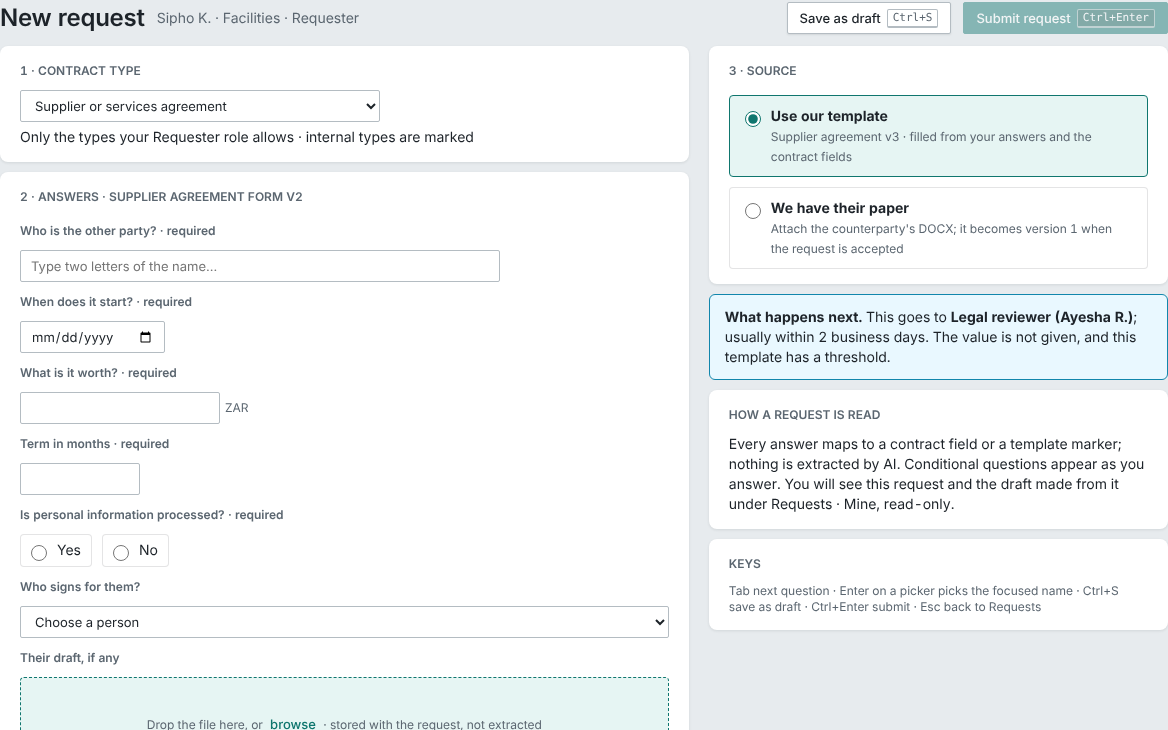
Ask for a contract
The form says who it goes to, and why, before you submit.
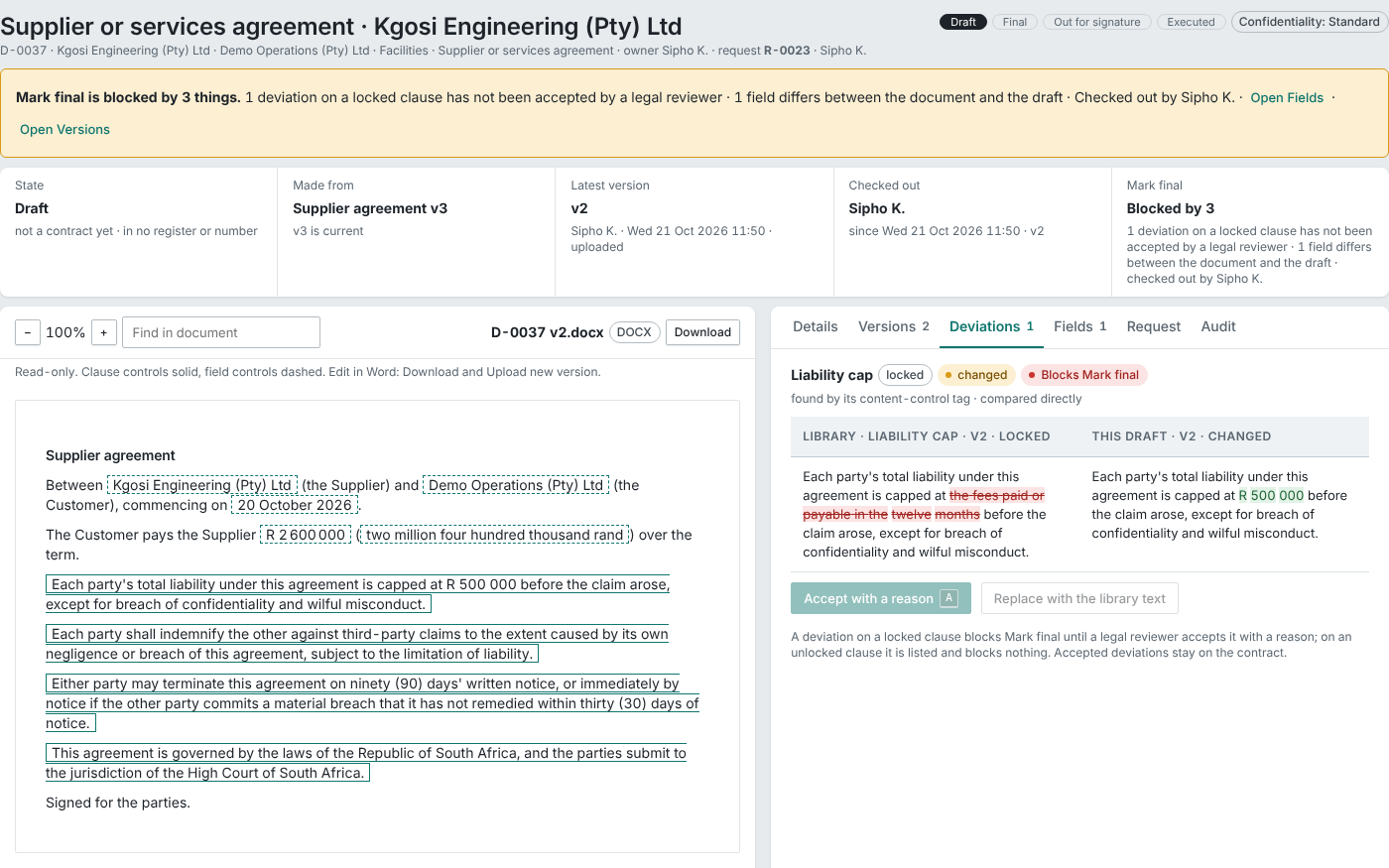
Every changed clause listed
A changed locked clause is listed beside the library text and stops the draft being finalised until a legal reviewer accepts it.
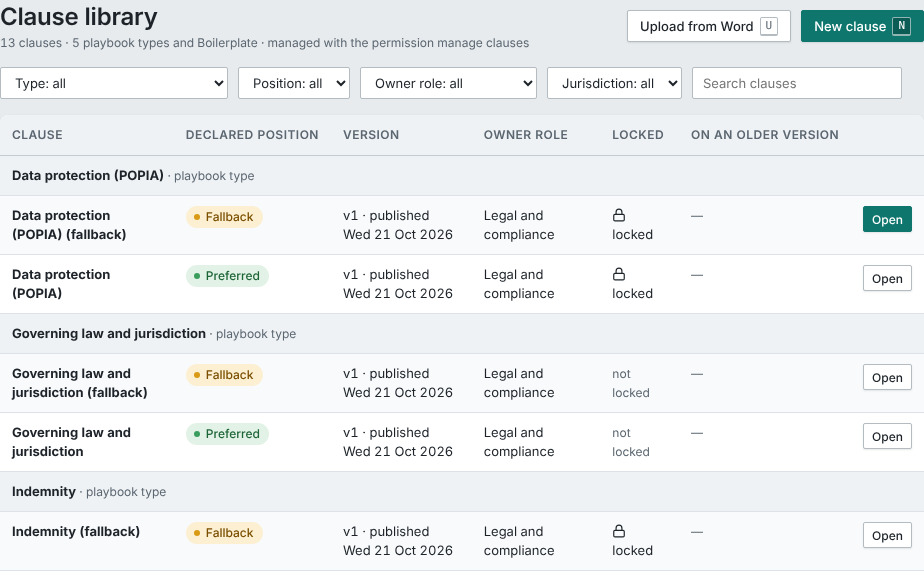
Your approved wording, by clause
Approved wording by clause type: preferred and fallback, versioned, owned by a role, locked where it matters.
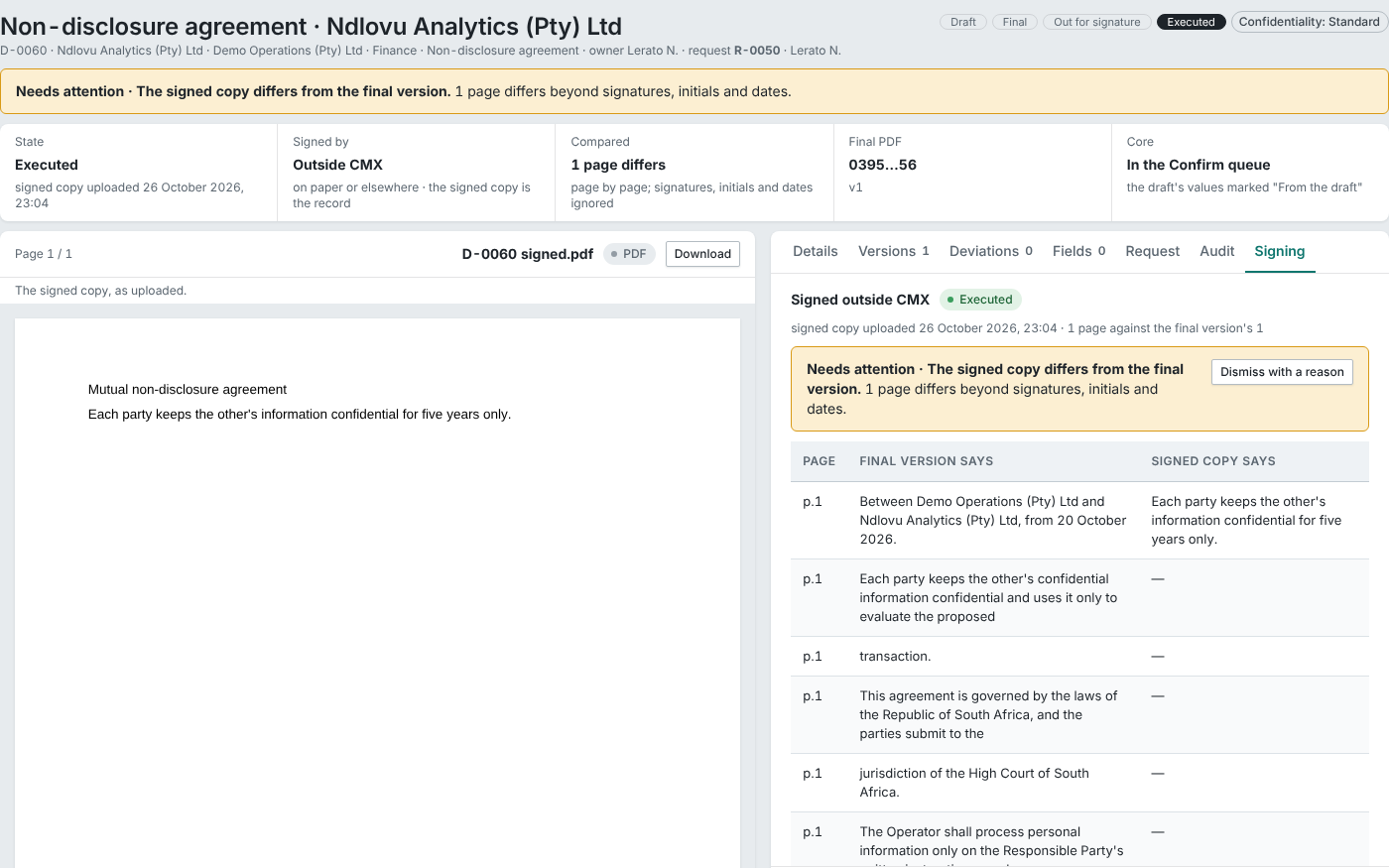
Signed outside CMX, compared
A copy signed outside CMX is compared with the final version. Any change beyond signatures, initials and dates is flagged.
The signing evidence, kept
Every signer, method and event is kept with the executed PDF.
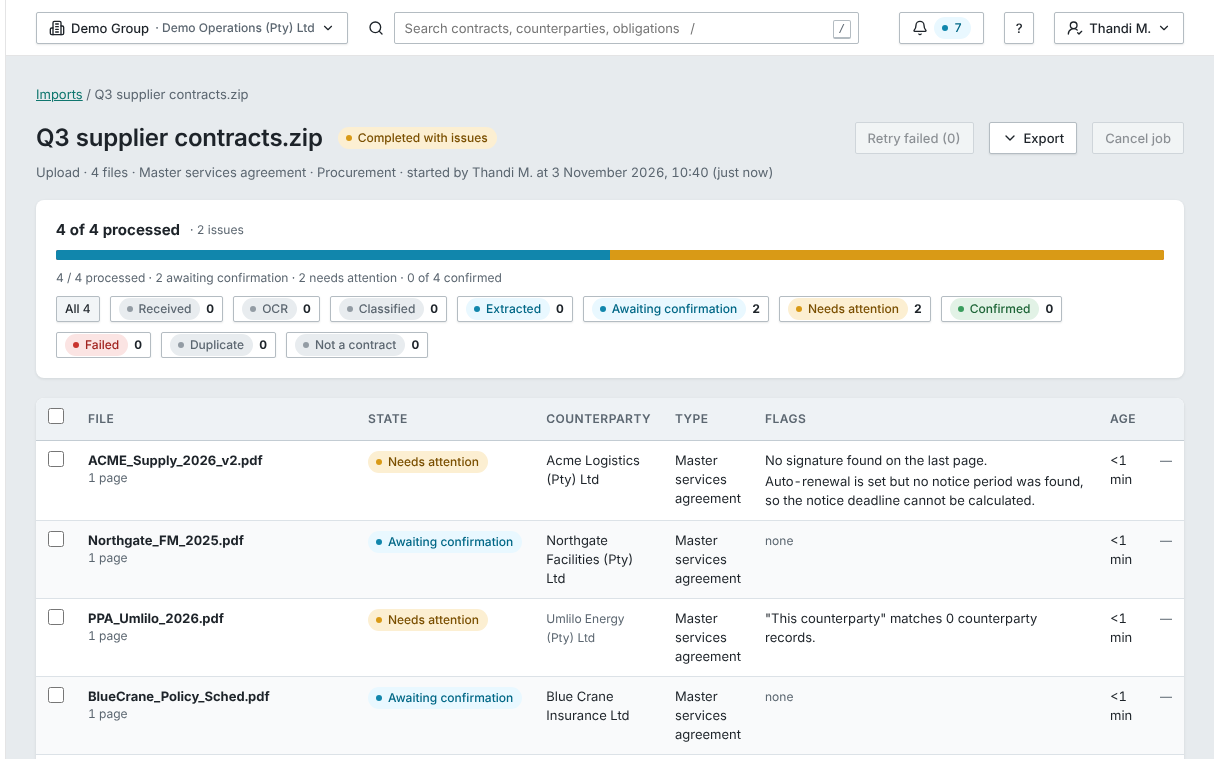
Bring in the whole back-book
One import for the whole back-book, with progress, failures and a needs-attention list.
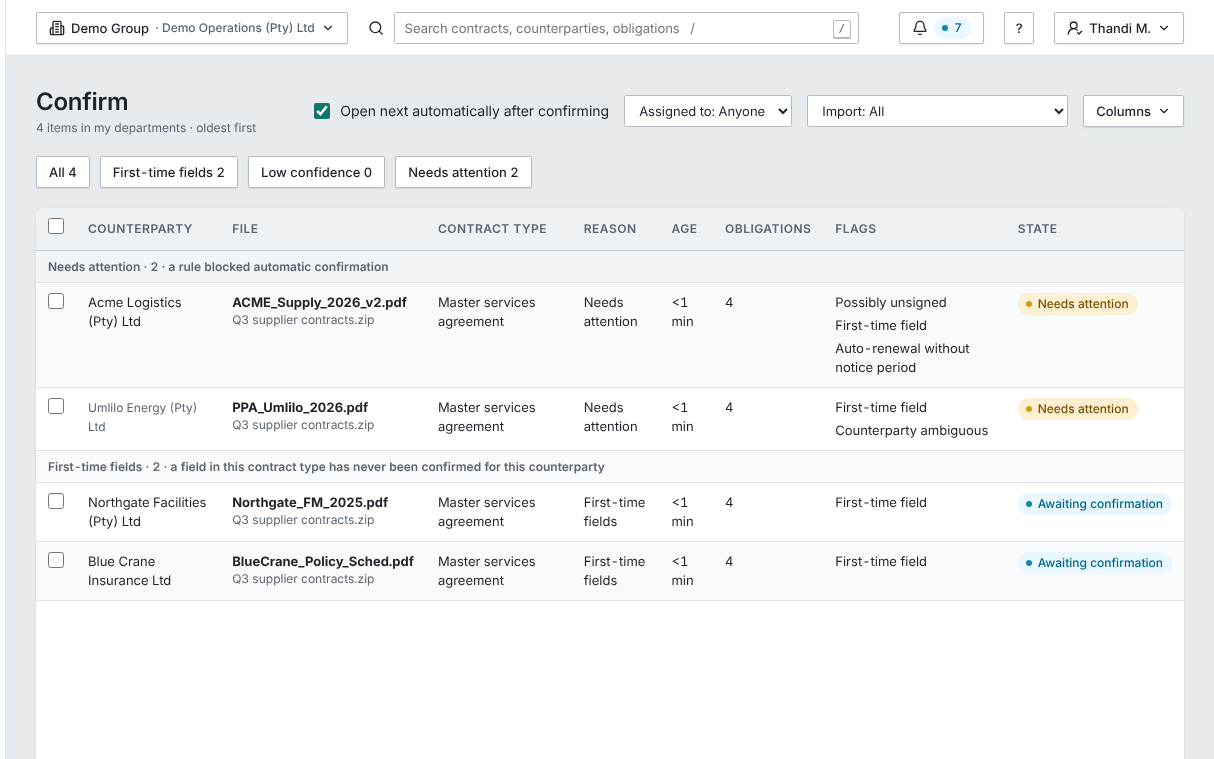
A person confirms each value
Each proposed value waits in the Confirm queue for a person. Nothing counts until someone confirms it.
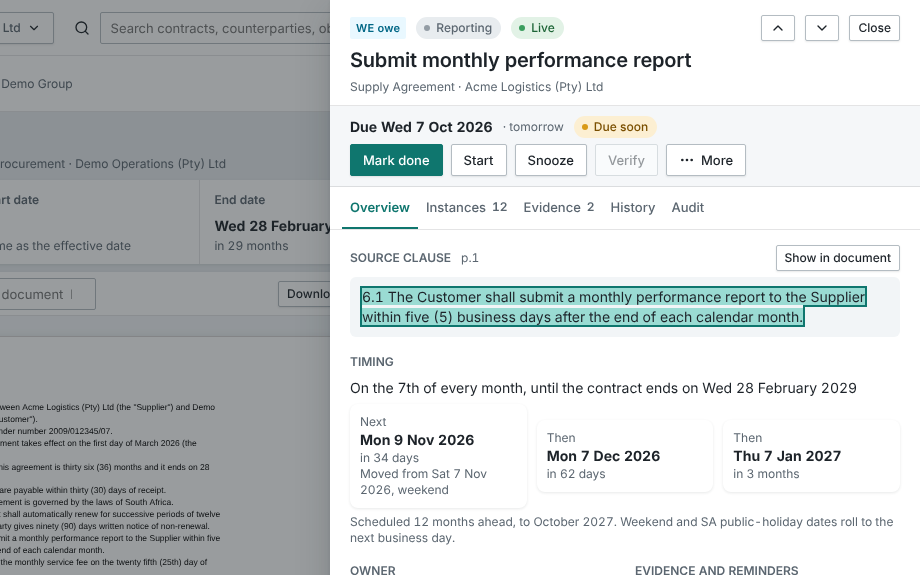
Each obligation shows its words
Each obligation shows the words it came from. Show in document opens the page.
Every number opens its list
Every tile counts only what the viewer can open, and opens the register with that filter.
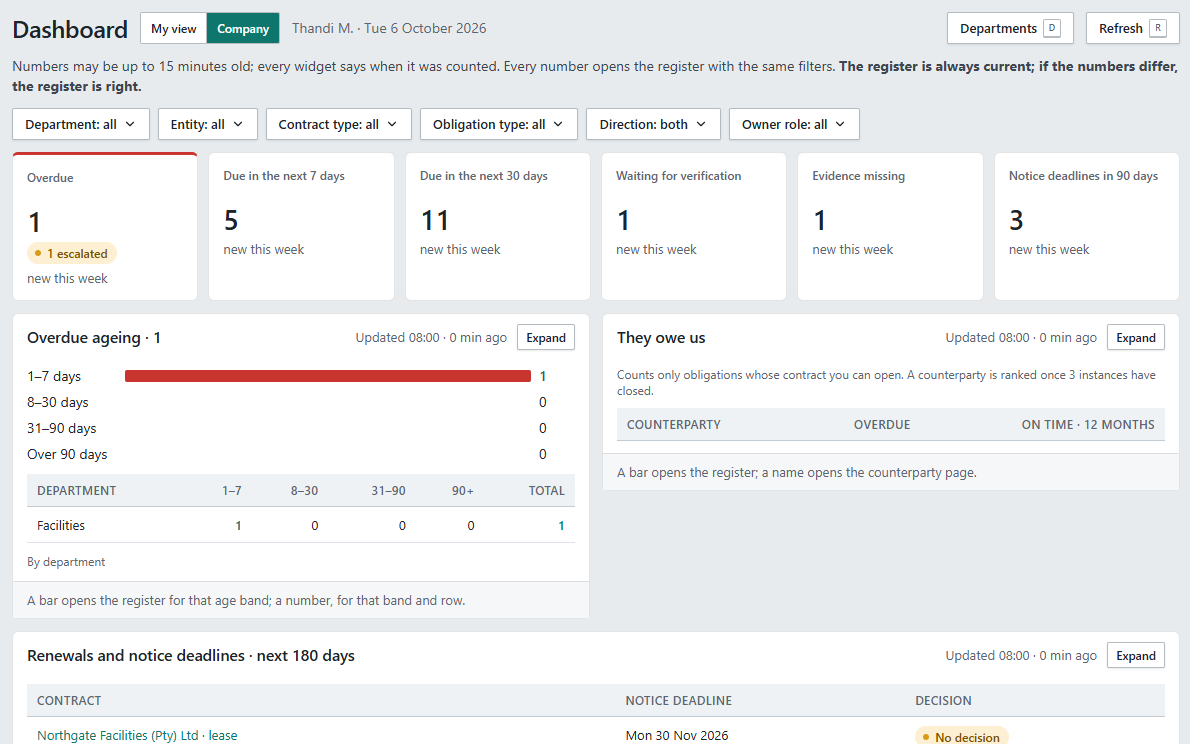
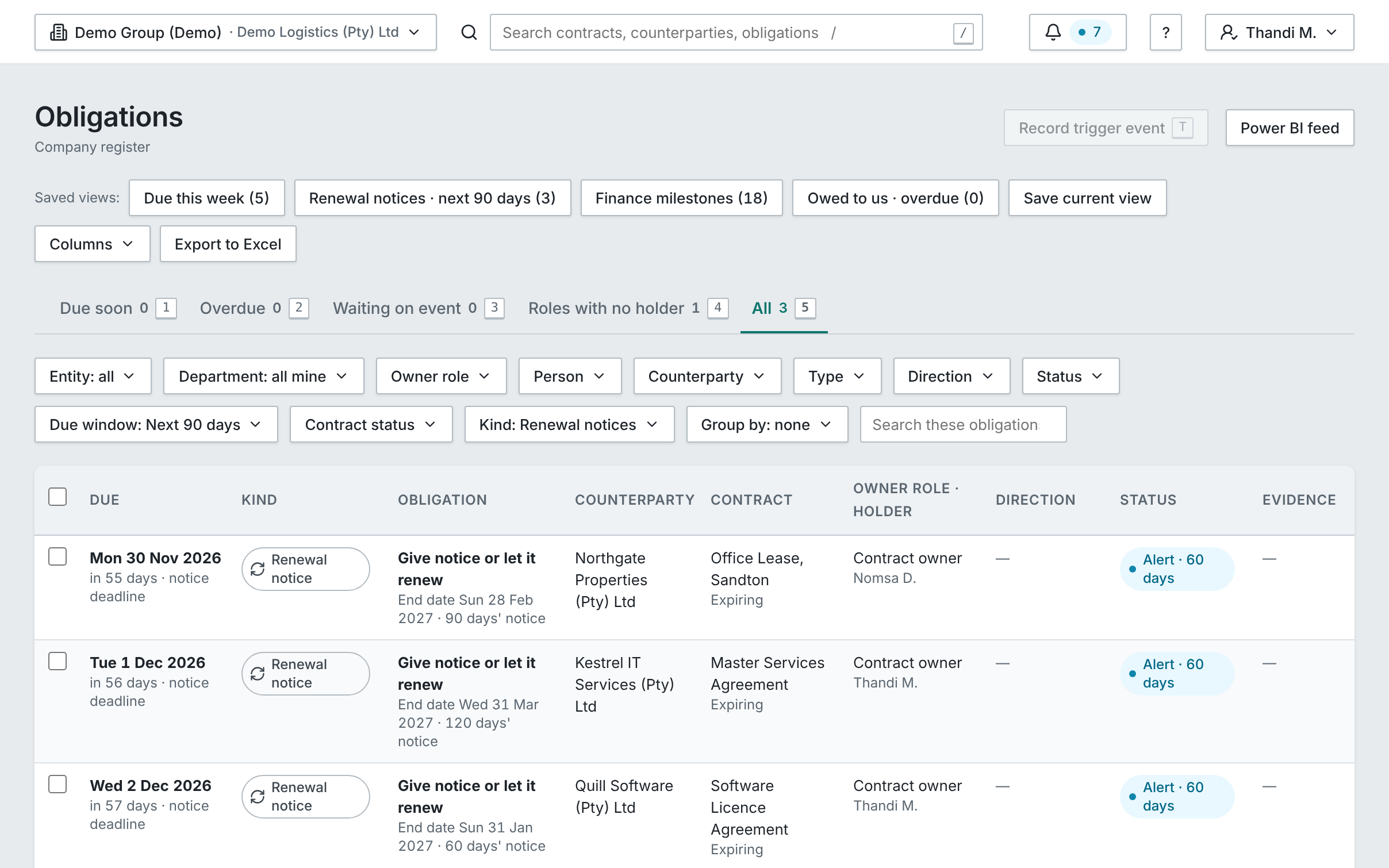
Every obligation in one list
Owed by you and to you, filtered, saved and exported, counting only what you can open.
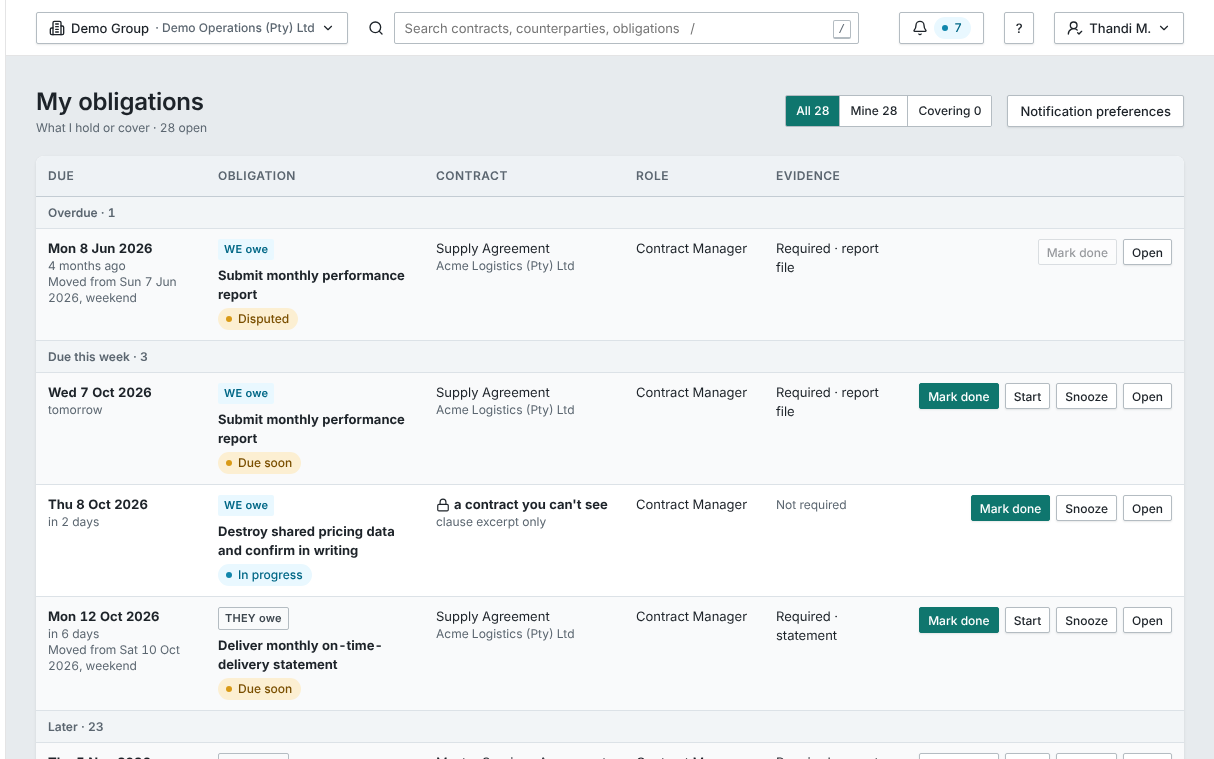
Obligations owned by roles
Each obligation is owned by a role and says what evidence it needs. Someone in that role who can’t open the contract still sees the clause.
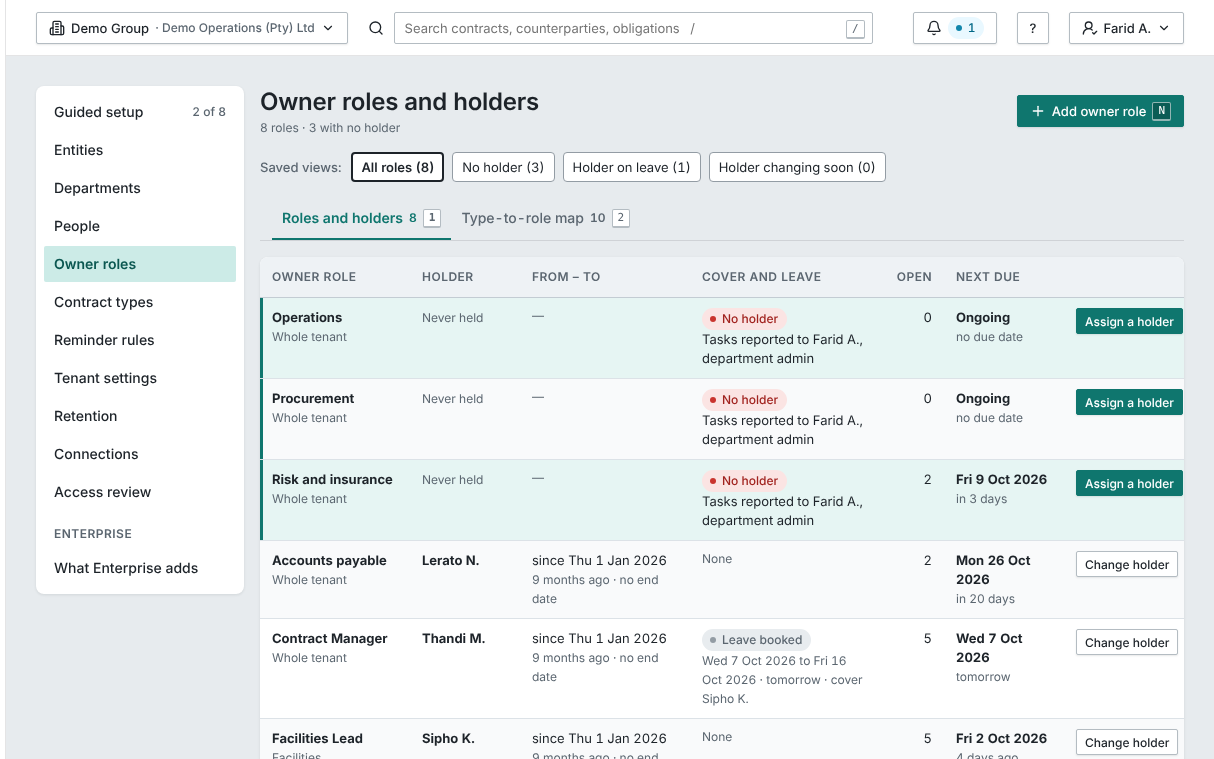
Roles, and the people in them
Obligations belong to roles. A role with nobody in it is reported to the department admin.
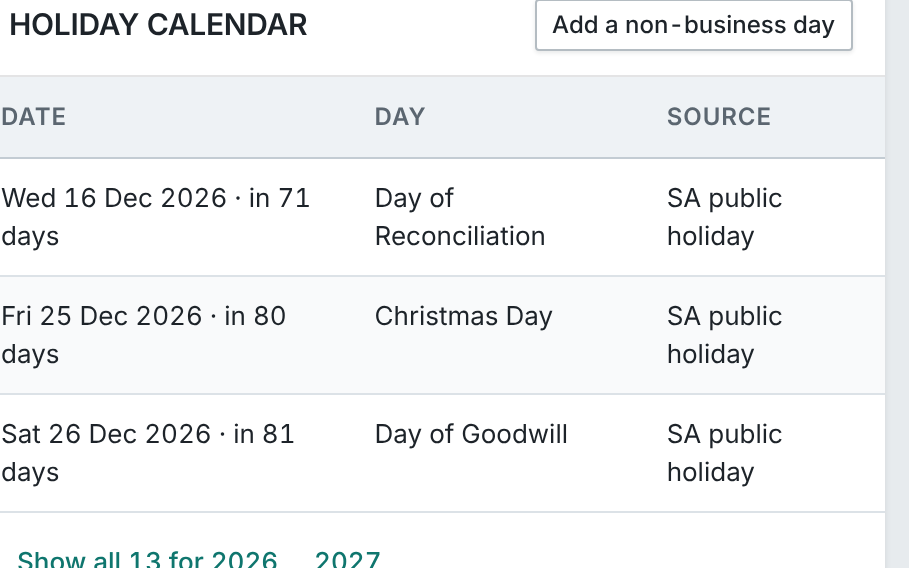
Your holidays, your due dates
Your public holidays, in your calendar: a due date on a holiday moves to the next business day.
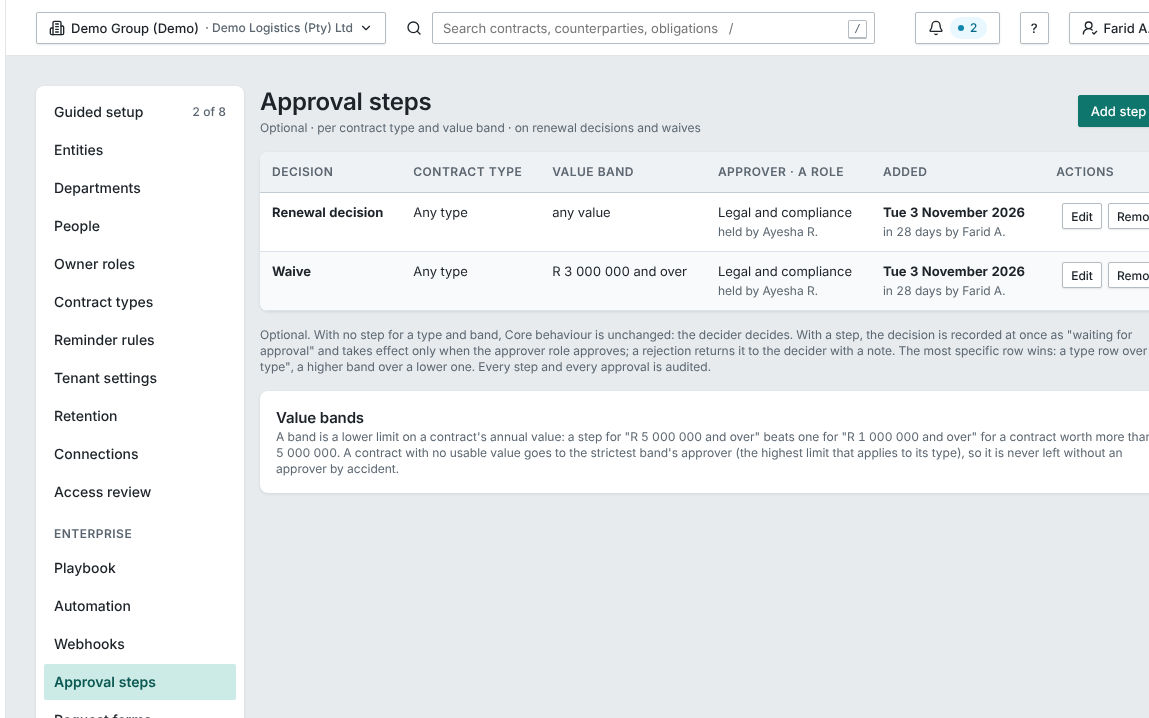
Approval steps on waivers
Approval steps on waivers and renewal decisions, by contract type and value band, with a role as the approver.
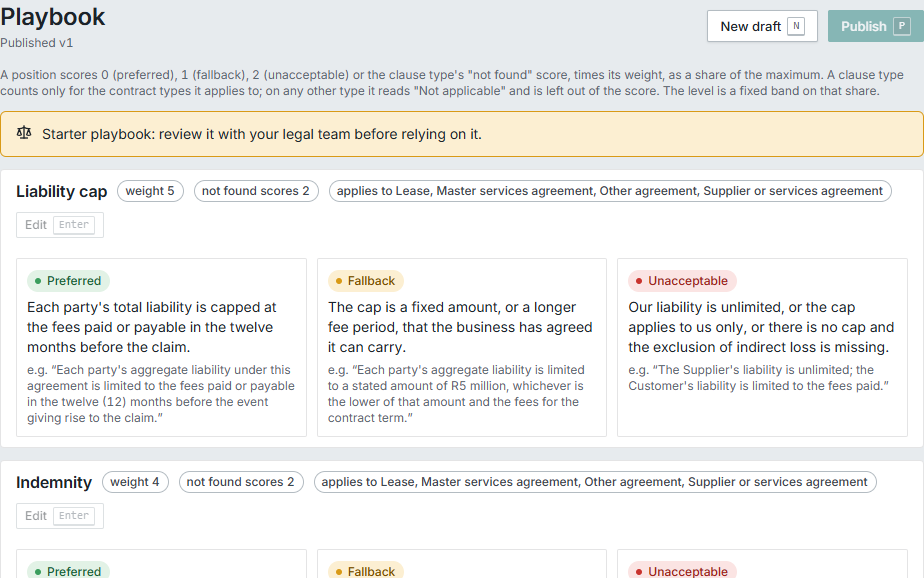
Your playbook, clause by clause
Your playbook: the position you accept on each kind of clause, with fallbacks and weights.
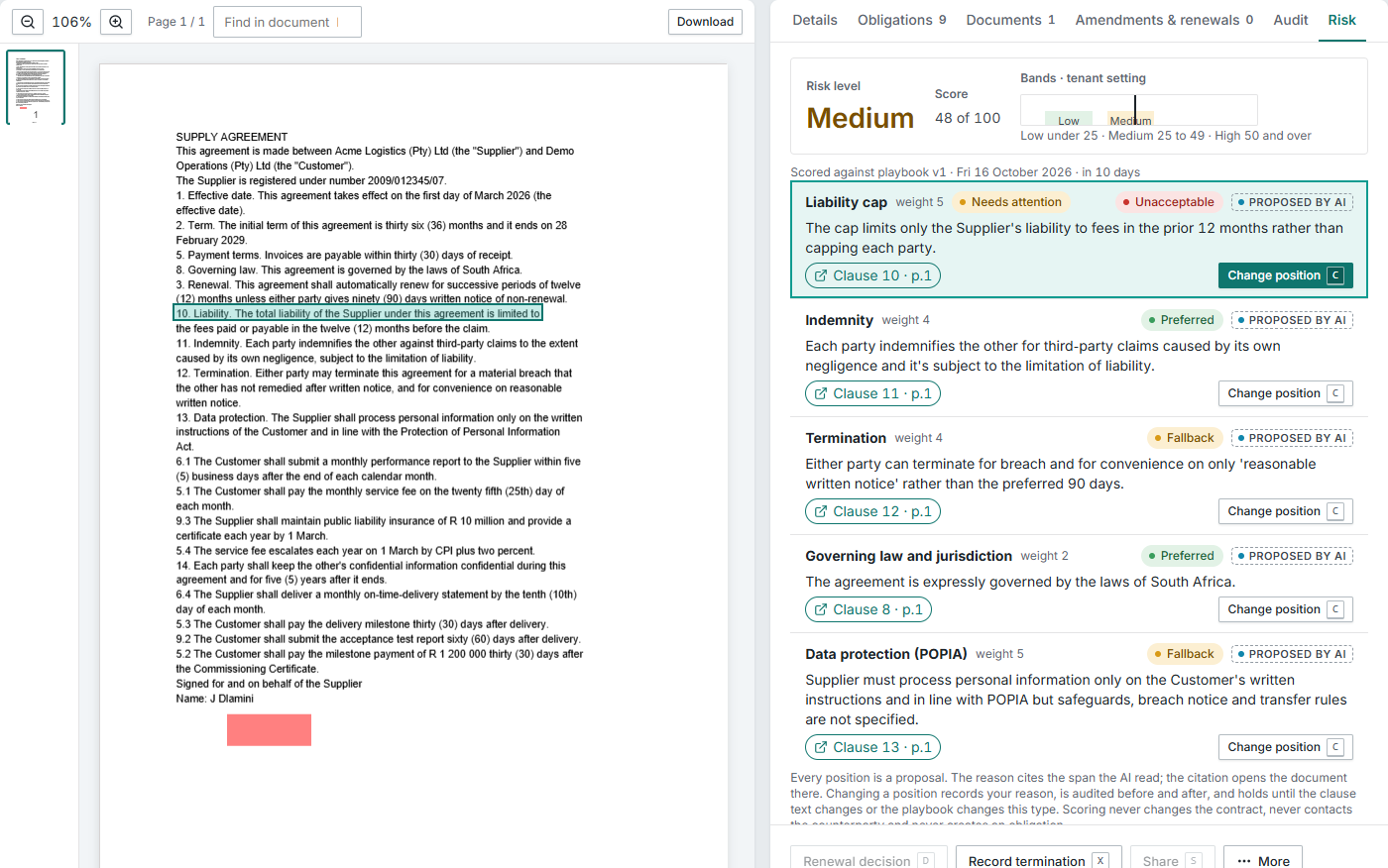
Risk, with the reason shown
The AI proposes each clause position with its reason and the clause it read. The level is a fixed calculation.
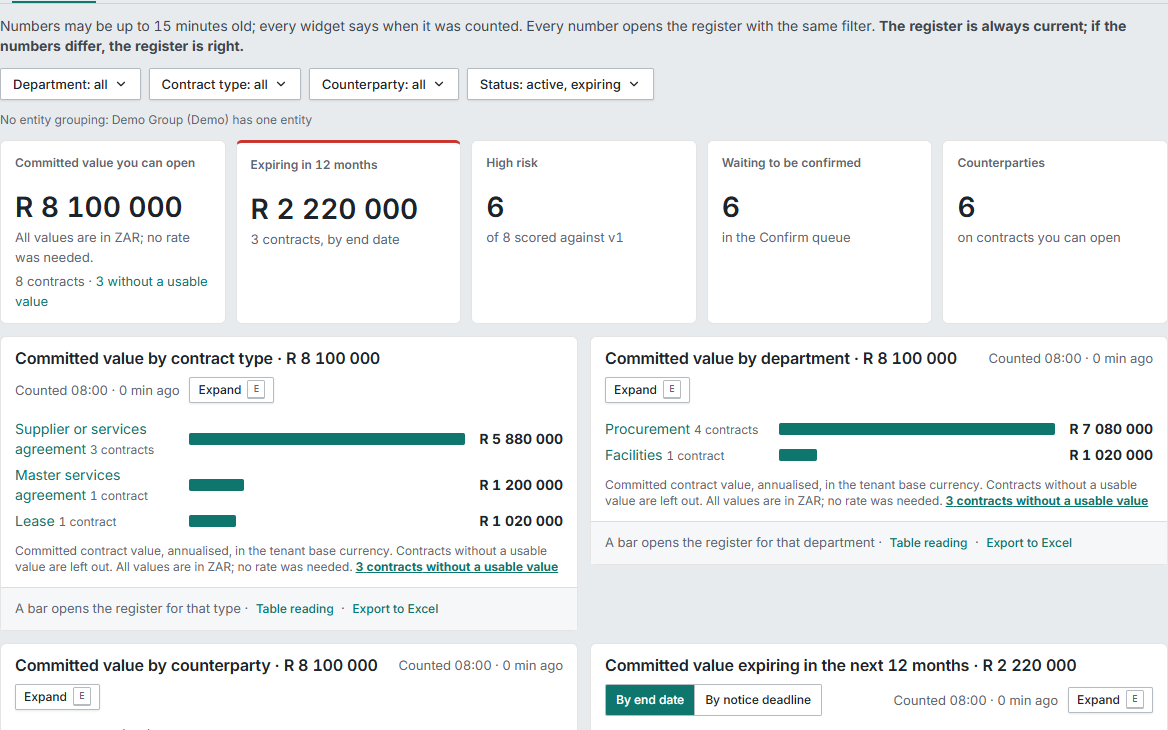
What your contracts are worth
Committed value by type, department and counterparty. Contracts without a usable value are counted, never shown as R 0.
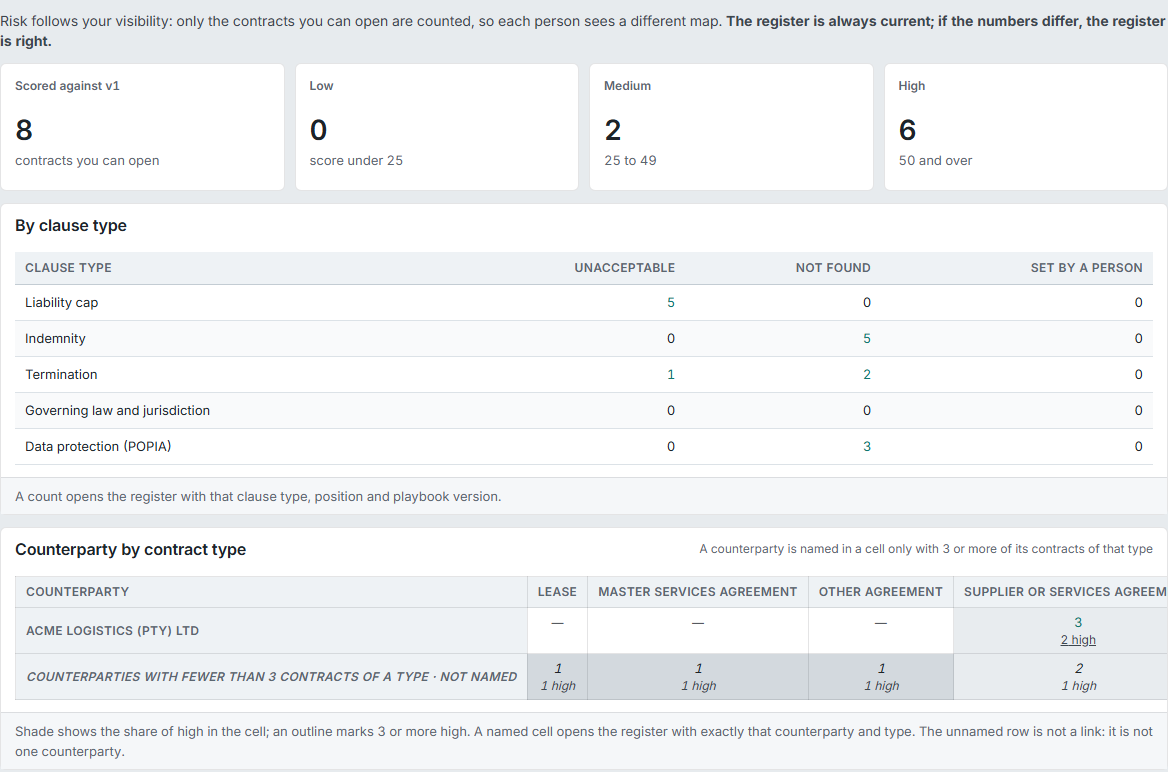
Risk across your contracts
Risk across your contracts by clause type and counterparty, counted only from contracts you can open.
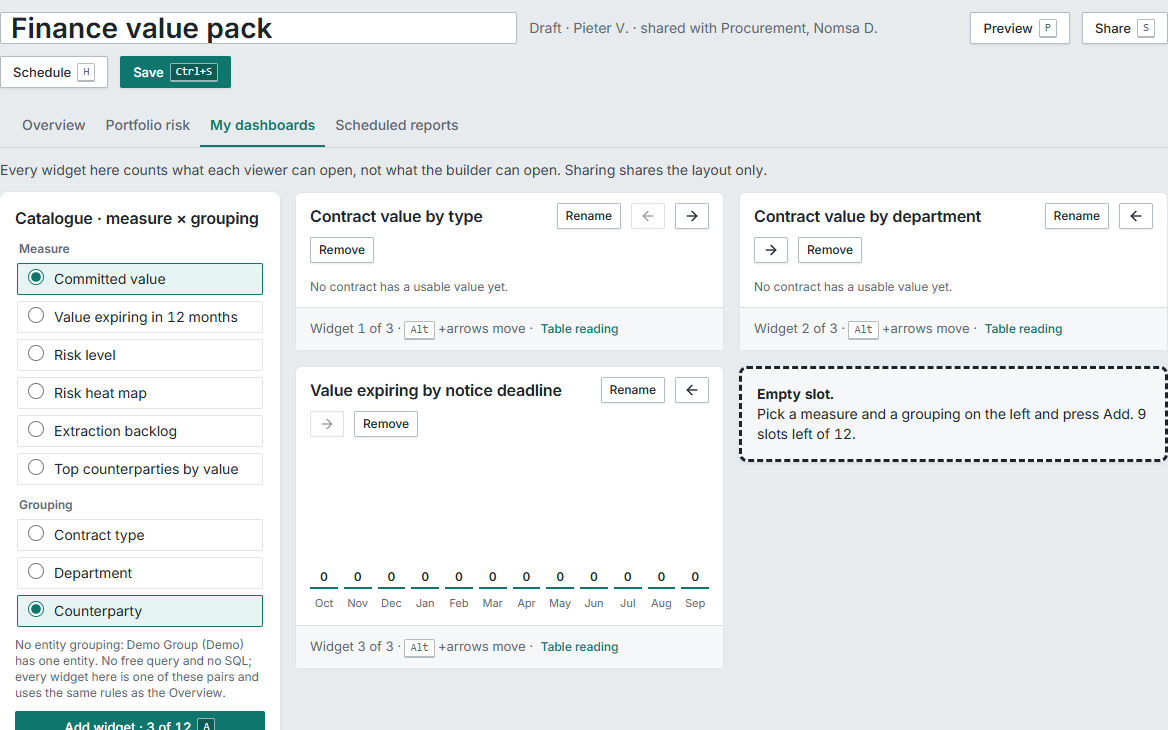
CMX’s own dashboards
Built from a fixed list of measures and groupings, with no other tool and no technical skills needed.
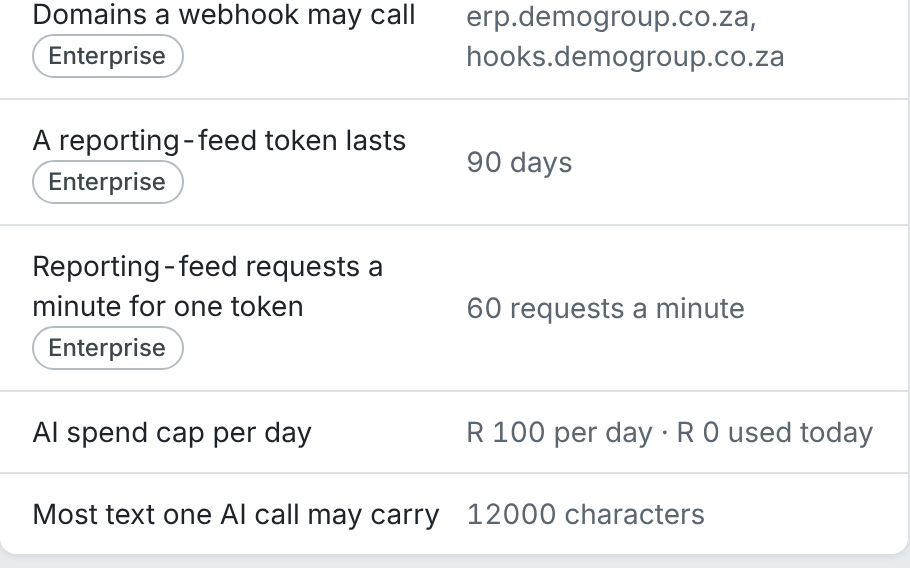
A daily AI spend cap
A daily AI spend cap you set. At the cap, extraction pauses until midnight and everything else carries on.
1 of 20
AI assistance
AI proposes, your people decide.
CMX uses AI to read, find and score, and shows its working each time. A person makes every decision that counts.
Reads every contract.
Classifies the type and extracts its fields and obligations.CoreAI assistanceShows its working.
Every value points to its page and words, with Show in document. A value it cannot ground is left empty, never guessed.CoreAI assistanceA person confirms.
Dates, amounts and parties are confirmed by your people. Nothing a model finds counts until someone does.CoreAI assistanceLearns from your corrections.
For that counterparty and contract type, in your workspace only.CoreAI assistanceRisk against your playbook.
Your playbook is the position you accept on each kind of clause. The AI gives its reason and cites the clause on every line; the level is a fixed calculation, never a model’s opinion.EnterpriseAI assistanceAsk across all your contracts, or one.
Get an answer with every statement cited.EnterpriseAI assistanceKept in bounds.
It never sees a contract the person asking cannot open. Contract text is data, never instructions. Zero retention and no training on your data. A daily spend cap you set.CoreEnterpriseAI assistance
What CMX does, every day
Each card opens its feature group. Core or Enterprise is marked on each.
Obligations owned by roles, not people
A person holds the role for a period; the next person in the role takes over open work from a set date.CoreObligations and owner rolesRenewal alerts from the notice deadline
At 90, 60 and 30 days before the notice deadline, not the end date.CoreReminders and renewalsThe obligations dashboard
My, Team and Company views. Every number opens the register with that filter.CoreRegister and dashboardEvery obligation in one register.
Everything owed by you and to you, across every contract you can open. Filter by department, owner role, type, direction and due date, save the view, and export to Excel.CoreRegister and dashboardNumbers you can click.
Every number on the dashboard counts only what you can open, and opens the register with exactly that filter.CoreRegister and dashboardFind any contract.
Every contract in one repository, with keyword search and filters, and each record’s details, documents, obligations, amendments, access and audit in one place.CoreRegister and dashboardEvidence and verification on every obligation
A type that needs evidence can’t be closed without it, and a second person verifies.CoreObligations and owner rolesThe clause library, every deviation listed
Approved wording by clause type. A change to a locked clause stops the draft being finalised until a legal reviewer accepts it.EnterpriseRequests and clausesRequest forms and templates
Anyone can request a contract; a low-risk one is drafted at once from your Word template.EnterpriseRequests and clausesDrafting in Word
Word stays the editor. Check out, edit, upload; CMX never re-renders the document.EnterpriseDrafting in WordElectronic signature with the evidence attached
A secure link, a one-time PIN and the certificate page on the executed PDF. No fee per signature.EnterpriseElectronic signatureApproval steps on waivers and renewals
By contract type and value band, with a role as the approver.EnterpriseApproval steps
Who it’s for
Finance
The committed value of your contracts, what expires when, and no obligation paid late or rebate unclaimed.CMX for FinanceProcurement
Every supplier’s obligations to you, and yours to them, with evidence, in one register.CMX for ProcurementLegal
Approved wording, every deviation listed, and a reviewer’s decision on every contract that needs one.CMX for LegalOperations
Your people get the task on the day, with the clause, even if they can’t open the contract.CMX for OperationsExecutives
One number per department that you can click to the list, and a risk heat map you can explain to the board.CMX for ExecutivesIT, security and the information officer
Separation enforced in the database, audit on every change, data stored in your region.CMX for IT
Your region, your rules.
Every line here is something CMX does today.
Stored in your region
Your contracts are stored in your region: South Africa today, with EU and US hosting on request as a dedicated deployment.
Your public holidays
Every due date and reminder respects your public holidays. South Africa’s are set up for you; the calendar is yours to edit.
Your financial year
Ask in your financial year’s quarters.
Your sign-in
Sign in with the Microsoft or Google identity your company already has.
Your playbook
A starter South African playbook, yours to edit.
Electronic signature
Electronic signature inside CMX, with the evidence attached to the executed PDF, and no fee per signature.
The AI
The AI runs under our contract with an enterprise AI provider, with zero retention and no training on your data.
Your currency
Priced in rand, excluding VAT, by the number of active contracts.
Security and trust
Separated in the database
Each company’s contracts are kept apart in the database, and tested on every release.
Every change recorded
Every change is recorded, with who made it, and can’t be edited.
Admins can’t read contracts
Admin roles give no contract access, and nobody changes their own roles.
AI kept in bounds
The AI never sees a contract the person asking cannot open.
Works with what you use
- Microsoft 365 and WordWord is the editor. With Microsoft 365 connected, the signing PDF is made through it.
- Outlook and Google calendarEach person’s due dates in the calendar they already use.Set up per customer at go-live.
- Microsoft TeamsReminders, approvals and My obligations as cards you act on in Teams.Set up per customer at go-live.
- Microsoft Power BIFor teams that already use Microsoft Power BI: each connection sees only what the person who set it up can open.
- Email-inForward contracts to your workspace’s import address.
- WebhooksEnterpriseAutomation rules tell your other systems when something happens, such as a contract signed, an obligation overdue or a renewal due. Each message is signed, goes only to addresses your admin allows, and carries references, never contract content.
- Microsoft and Google sign-inSign in with the identity your company already has.
Core and Enterprise
- CMX Core
Bring in the contracts you already have and manage their obligations.
Import from files, a ZIP, a spreadsheet of your old register or email. AI extraction with a person confirming. Obligations per contract and company-wide, owner roles, evidence and reminders. Renewal alerts, a calendar, keyword search and the obligations dashboard. Departments, restricted contracts, and sign-in with Microsoft or Google.
- CMX Enterprise
Everything in Core, before and after signature.
Risk scored against your playbook. Questions across all your contracts, every answer cited. Value, CMX’s own dashboards, scheduled board packs and a Microsoft Power BI feed. Automation, approval steps on waivers and renewals, and Teams cards. Request forms, Word templates, a clause library and drafting in Word. Electronic signature inside CMX.
About QED Works
Proven rules decide.
A rule you can read decides each outcome, not a model’s opinion.
AI proposes, your people decide.
AI reads and suggests; a named person confirms; every suggestion points to its source.
What’s agreed is kept and shown.
Every record carries its evidence, its audit trail and who did what.
QED Works builds software that proves what was agreed was done. It rests on more than twenty years of delivering document, workflow, contract and accounts payable systems to banks, insurers, retailers, manufacturers and government.
Questions
Where are our contracts stored?
Your contracts are stored in your region: South Africa today, with EU and US hosting on request as a dedicated deployment.
Does the AI decide anything?
No. AI proposes, your people decide. It proposes dates, parties, amounts and obligations, each pointing to its page and words, and a named person confirms them. A risk level is a fixed calculation from your playbook, never a model’s opinion.
Is our data used to train the AI?
No. The AI runs under our contract with an enterprise AI provider, with zero retention and no training on your data.
Do we have to change how we draft?
No. Word stays the editor. Templates and drafts are Word files, edited by check-out, and CMX never re-renders the document.
Can we bring in our old register or spreadsheet?
Yes. Add it to the import as a CSV or Excel file. Rows are matched to files by name, their values take precedence, and any mismatch is flagged for a person.
How is it priced?
Priced in rand, excluding VAT, by the number of active contracts. Only managers are paid seats; viewers and obligation owners are free and unlimited. Core is from R 1 750 a month and Enterprise from R 4 150 a month.
What happens when someone leaves?
Obligations belong to roles, not people. Give the role to someone else and they take over its open work from the date you set. Removing a person reassigns their roles, cover and access lists first, and is recorded.
How does CMX handle POPIA and other privacy laws?
CMX is built for POPIA and the privacy laws modelled on the same principles: data stored in your region, access decided in the database and limited to the people who need it, a record of every change, retention and deletion you set, signers’ details shown only to people who can open the contract, and a breach procedure.